KRT Studio
A single self-hosted AI studio: image, video and audio generation and editing on your own GPUs, in one interface.
- 40+ models
- image · video · audio · TTS
- 12 editor tools
- VRAM-aware runtime
What it is
One studio that works with open models on your own GPUs: image generation and editing, video generation, music, TTS and sound effects. Not a wrapper around a single API and not a pile of disconnected web UIs, but a workspace with shared sessions, history, and results that carry between workflows.
Why it exists
Every new open model arrives with its own launcher, its own parameter set and its own interface. A month later you have five different UIs, five folders of results and no shared history. The motive behind KRT Studio is simple: a new model should be added to the existing studio rather than standing up yet another interface.
Architecture
The request path: UI → API → workers → model runtime → S3.
- UI — a React app: sessions, projects, workspace, comparison, the built-in editor.
- API — FastAPI: routers per modality, services for generation, batches and comparison, progress over SSE.
- workers — a custom protocol, serialization and supervisor. There is no off-the-shelf queue such as Celery in the project.
- model runtime — model drivers and a specification registry, loading and unloading against available VRAM.
- storage — S3, MinIO or a local disk; PostgreSQL or SQLite. Chosen by config.
A model registry instead of a fixed form
Every model declares its own capabilities and limits: step and guidance ranges, supported resolutions, how many LoRA adapters it accepts and at what weight, plus model-specific parameters. The interface renders only the controls that apply to the selected model, with that model’s defaults.
So one model exposes a guidance slider from 0 to 15, another has it fixed, a third takes no guidance at all, and a fourth works only at seven predefined resolutions. The form is never reduced to a lowest common denominator.
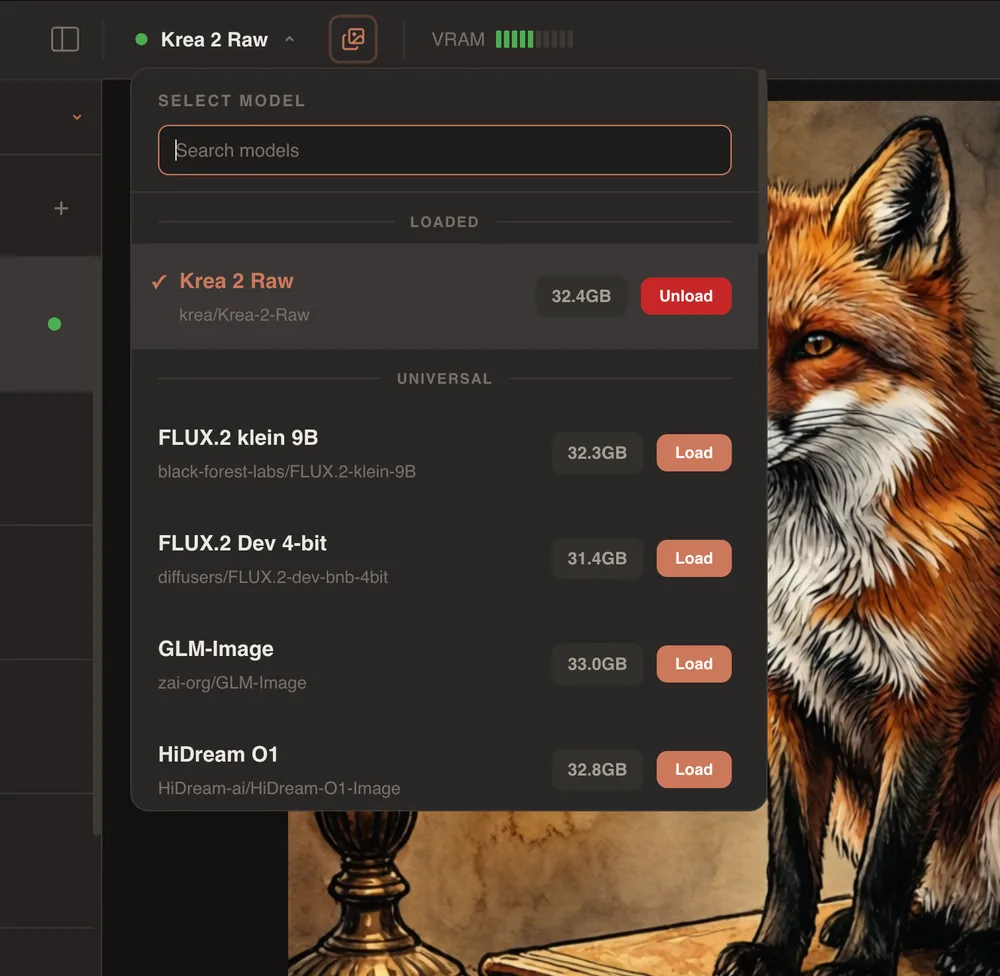
Loading and unloading are explicit operations, and each model states what it will cost in VRAM. 32.4 GB is loaded; to bring in the next one, the current one has to go. That is not an interface limitation but an honest reflection of how a GPU works: two 32 GB models do not fit in one card, and it is better to show that up front than to fail halfway through a generation.
More than forty open models are currently wired in. A selection:
- Video — Wan 2.2, LTX 2.3, MiniMax H3, Kandinsky 5.0, LongCat Video
- Image and editing — FLUX.2, Qwen Image, GLM Image, Z-Image, HiDream, Krea 2, LongCat Image, Mage-Flow
- Audio — ACE-Step, Qwen3-TTS, Stable Audio, VoxCPM, HeartMuLa, MOSS SoundEffect
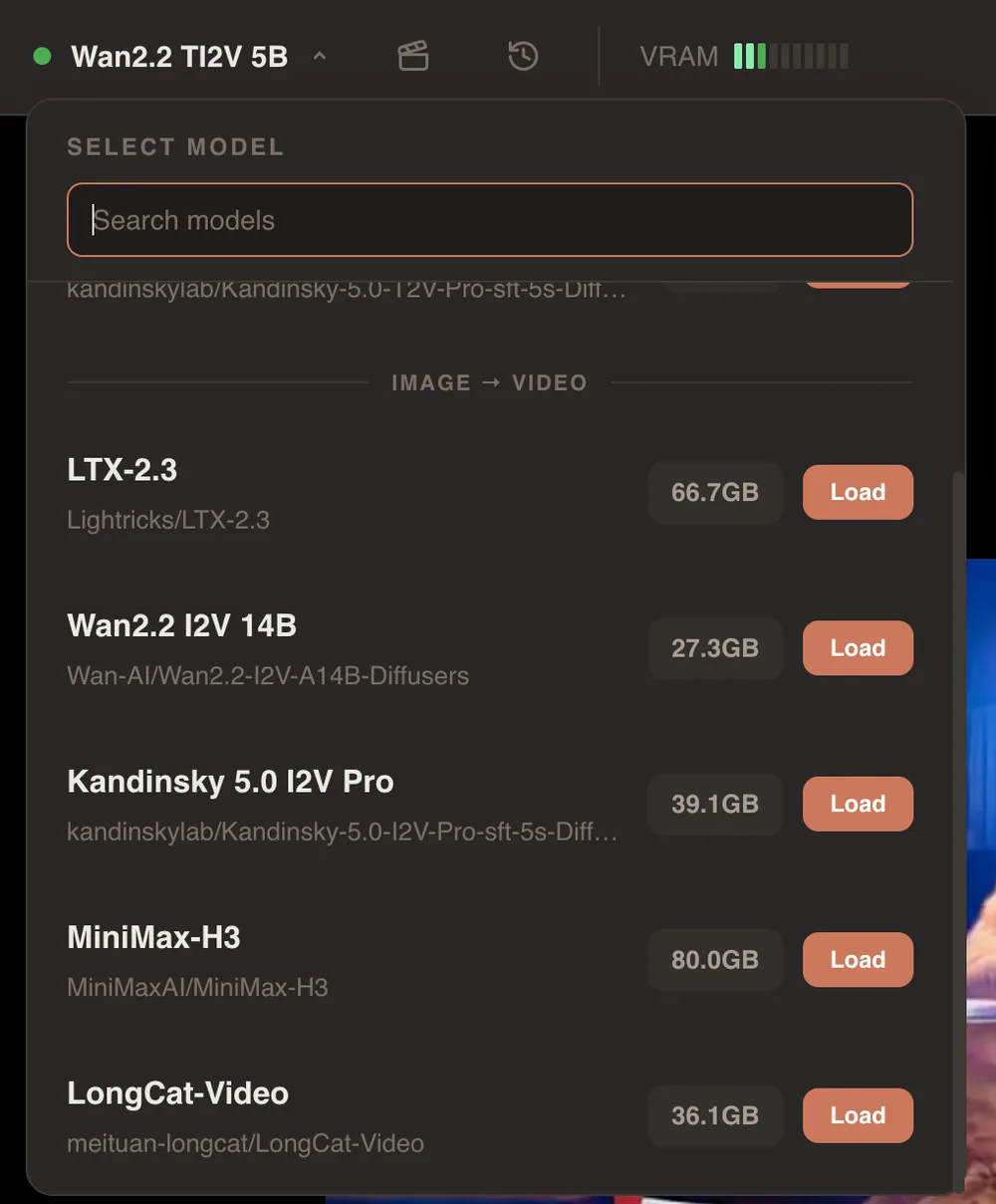
Next to every model is what it will cost in VRAM. From 27 GB for Wan 2.2 I2V to 80 GB for MiniMax-H3, so the decision about what to load is made before you click, not after you run out of memory.
Three modalities in one interface
Image, Video and Audio are not separate applications but tabs of the same studio, sharing sessions and a single result history.
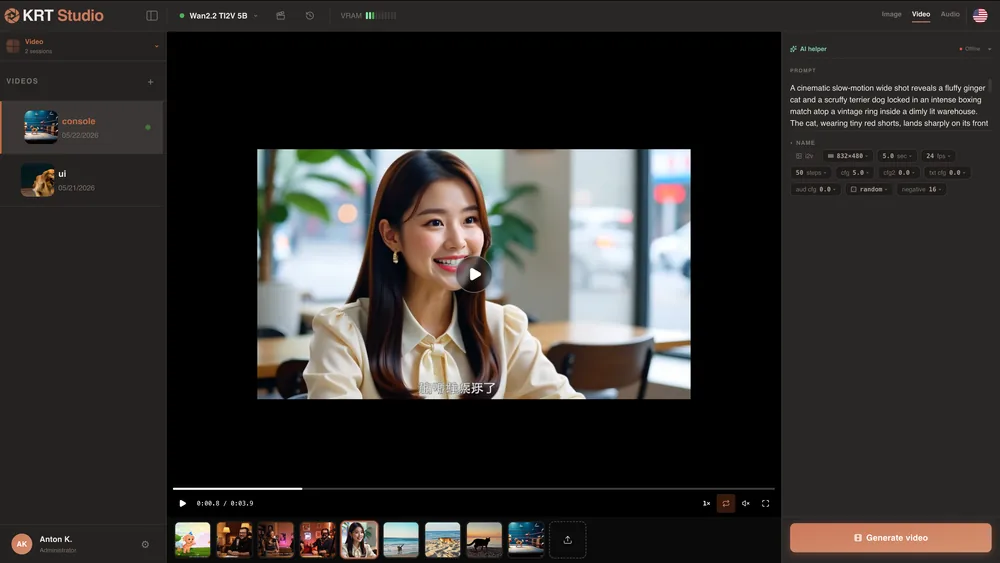
Video: image-to-video and text-to-video, duration and frame rate, per-model guidance parameters, and a player with the history alongside.
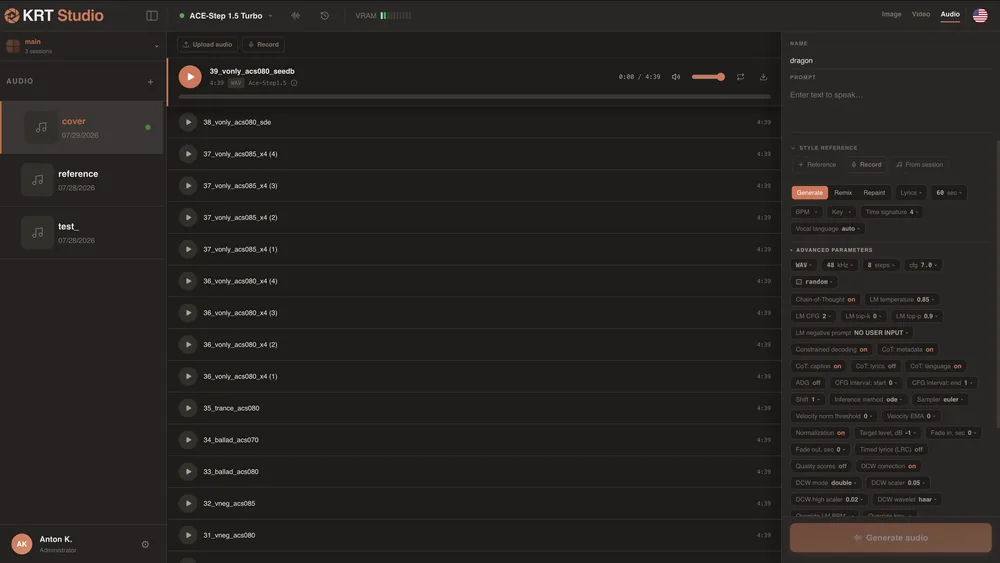
Audio: music, TTS and sound effects. Three ways to work with a track — generate, remix, and repaint a section; a style reference can be uploaded, recorded from the microphone, or taken from the current session. The advanced parameter panel here is the densest in the whole studio: from BPM, key and time signature through to the sampler, normalisation and the language model’s chain-of-thought settings. This is exactly where a capability registry pays off — flattening that into a shared form would be pointless.
The AI Director
A short request is expanded into a detailed prompt by a local model: “Pomeranian with glasses” becomes a description covering frame material, lighting, background and mood. The reverse mode exists too — describing an image you already have.
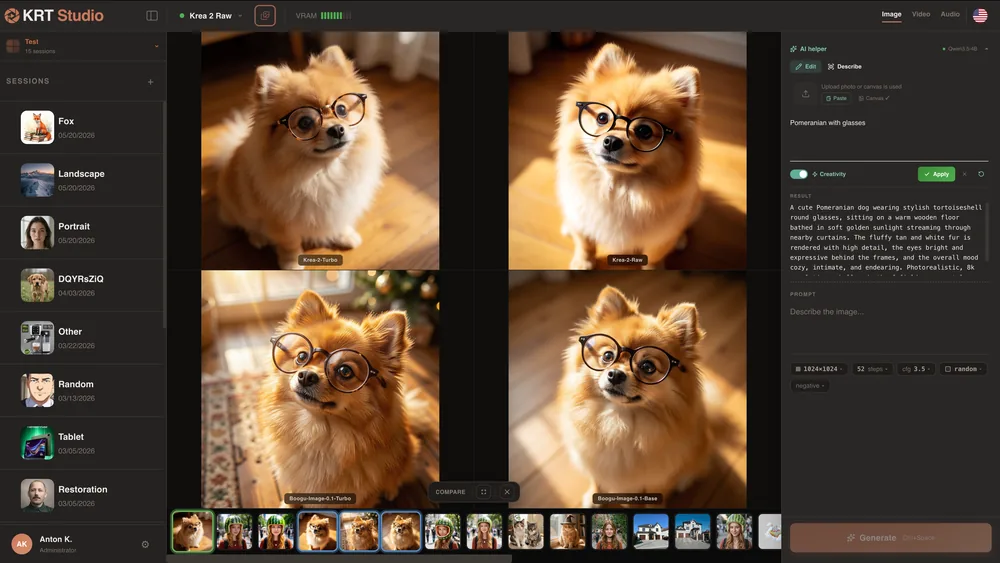
The whole working loop is visible in one frame: sessions on the left, the expanded prompt and parameters on the right, and in the centre what four models made of the same request.
The model is reached through any OpenAI-compatible endpoint: your own inference server, a local runtime or a cloud provider, decided by whoever deploys the studio. In the main screen shot above it is a Qwen3.5-4B.
The point is not to “add AI to the interface”. Output quality for most image models depends heavily on prompt length and structure, and nobody writes descriptions like that by hand for every request. So prompt expansion belongs inside the working loop rather than in a separate chat window.
Batch generation
Mass generation is not a side script but part of the studio: the job runs in the background, the window can be closed, progress is visible per model and per prompt, and state survives a restart.
The first large run produced 6,600 images across eleven models. The set then grew to seventeen, and the final array came to 10,200 images — roughly 72 hours of generation in total. The long jobs ran without restarting the process, thanks to batch locking, a status registry and state reconciliation on the API side.
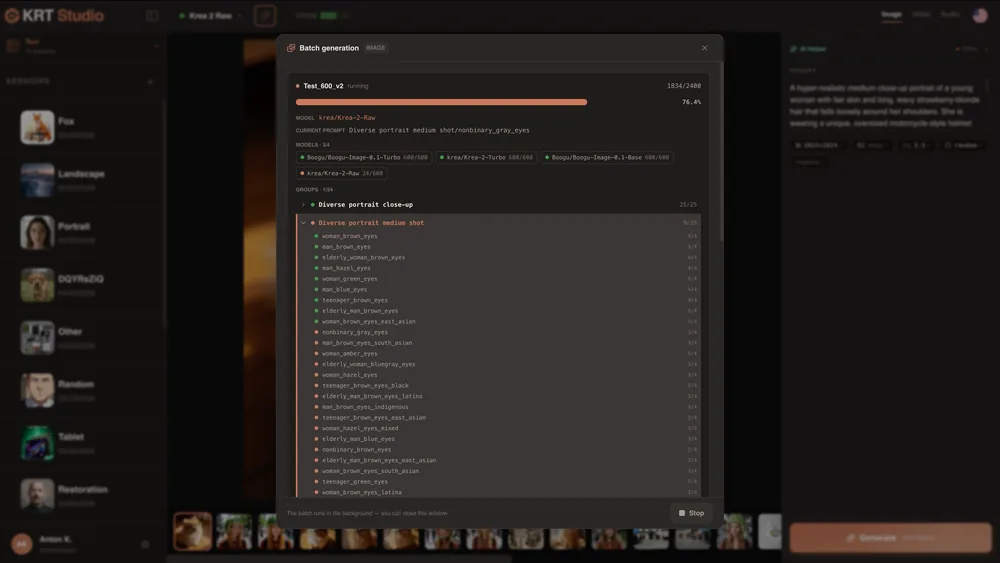
Progress is visible at two levels: per model — how many prompts each one has cleared — and per prompt group — how many frames are done inside the group. The line at the bottom of the window says the important part: the job runs in the background and the window can be closed.
The result is public: an open dataset and an interactive comparison where you can pick a prompt and put the models side by side.
Comparing results
Comparison works two ways. As a grid — results from different models for the same request sit side by side, each frame labelled with its model. As an A/B slider — two variants under one divider you can drag.
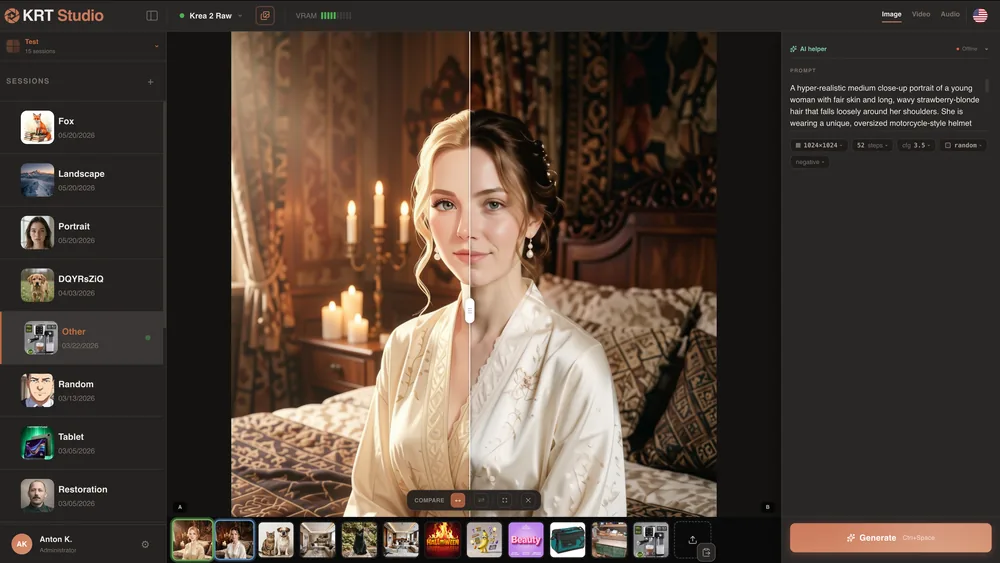
The slider is what you need when the difference between variants is in the details rather than the composition: on a grid two similar frames look identical side by side, but under the slider you can see exactly what changed.
The built-in editor
Twelve tools: transform, crop, rotate, flip, scale, correction, brush, text, layers, filters, canvas extension and export. Curves, snapping, rulers, the navigator and the before/after split are custom implementations rather than a bundled library.
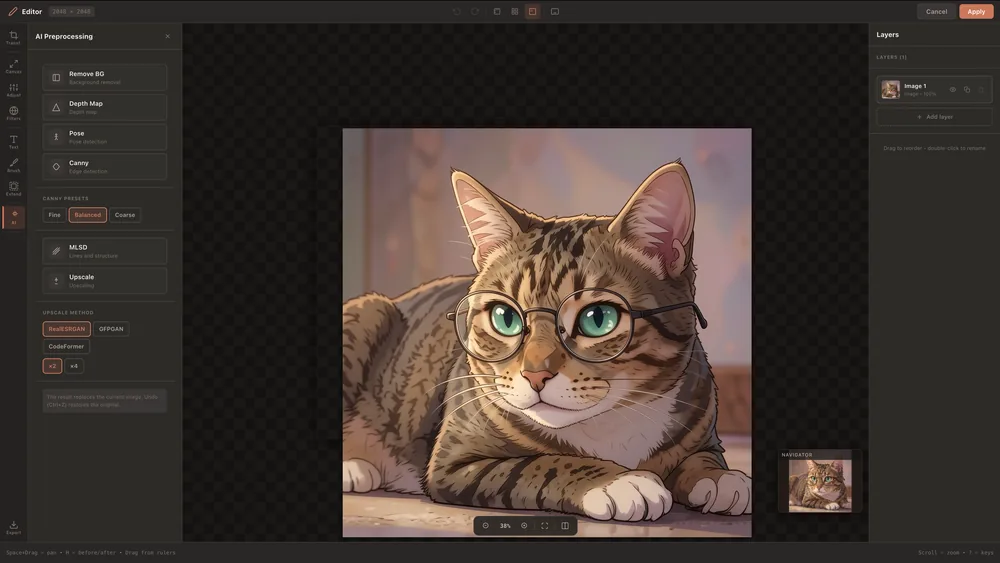
Preprocessing is its own layer: background removal, depth maps, pose detection, Canny edge detection with three presets, MLSD for lines and structure, and upscaling through RealESRGAN, GFPGAN or CodeFormer at ×2 and ×4. This is the kind of thing that usually lives in a separate application and moves between them as files; here the result stays in the same session.
What I built
The entire project, solo: product architecture, backend, worker protocol, model runtime, frontend, editor and the batch pipeline.